Claude, ChatGPT, Cursor and Grok can now work your inbox for you. Find, read, draft, send, clear, file and follow up, from one sentence, all as you.
What is MCP?
MCP, short for Model Context Protocol, is how an AI assistant uses another app. Claude, ChatGPT, Cursor and Grok all speak it. Connect Perfect Mail once, and your assistant can do almost anything you do in your inbox, for every account you’ve added, without you opening it.
You ask
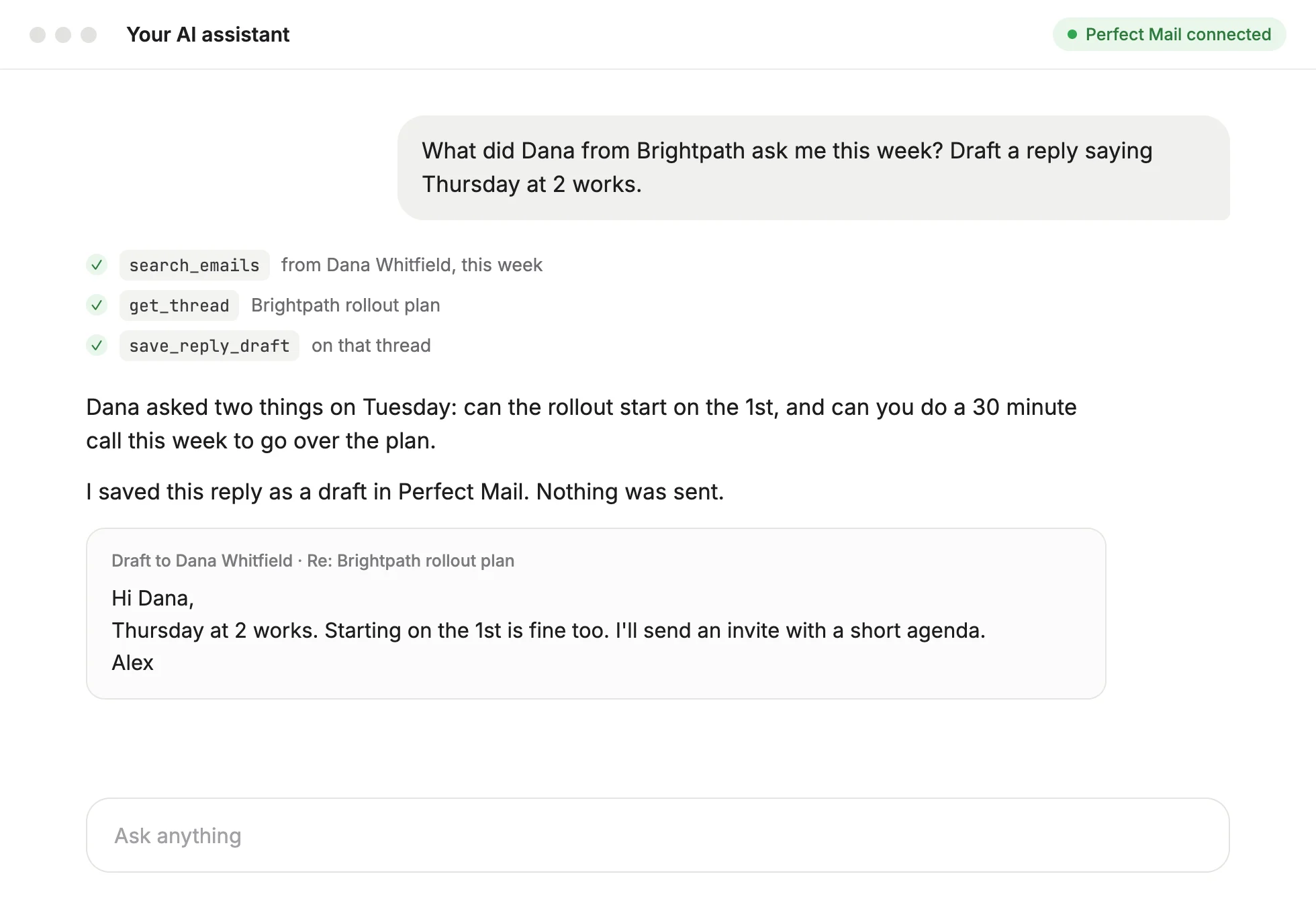
In Claude, ChatGPT, Cursor or Grok, in plain words: “What did Dana ask me this week? Draft a reply.”
It works in your inbox
Through MCP it uses Perfect Mail the way you do: it searches, reads the thread, writes the draft.
You stay in charge
It acts as you, on your own mail only. Anything to someone new waits for your OK.
Ask for it. It’s done.
One sentence. It searches, reads the thread and saves a draft.
“Which emails from the last three days still need an answer from me?”
“Find the signed contract from the supplier and tell me the renewal date.”
“Archive every newsletter from yesterday and mark the rest as read.”
“Turn the to-dos in Alex’s last email into my to-do list.”
“Send everything from this sender to Receipts from now on.”
“What did Priya agree to on our call on Monday?”
72 things it can do.
Most email MCP servers stop at search and draft. Google’s own Gmail MCP server has 9 tools and can’t send. Perfect Mail’s has 72, so your assistant can run your whole inbox, not just read it.
Find and read 5
Search every email account at once, or one
Read whole threads
Open the files on them
See which accounts you have
Look up your contacts
Write and send 7
Write replies and save them as drafts
Start new drafts, open, change or throw them away
Send a draft or a new email, from the account you pick
Reply, reply all and forward, with files
Sends only once you allow it. Anything new waits in Triage
Clear your inbox 6
Archive
Snooze until later
Mark as read
Trash
Report spam, or not spam
Sort and file 16
Make, rename and remove tags, and tag threads
Make and edit categories, and move threads into them
Sender rules: where a sender’s mail goes from now on
Sort by sender in bulk
To-dos, notes and reminders 13
Turn an email into a to-do
Update, finish or bring back to-dos
Write, edit and file notes
See and finish your reminders
People and lists 11
Save, find and remove contacts
Build contact lists, add and remove people
Merge two lists into one
Snippets and templates 7
Save the replies you type often
Keep email templates
Edit or remove either
Texts and calls 3
With Quo connected: search texts, voicemails and call summaries
Read one person’s texts and calls
Read a call in full, with its transcript
Grok Bot 4
Pick up the emails you send to a bot
Post its answer back on the email
Your mail and your control
An assistant reaches your mail only after you press Allow on a Perfect Mail page.
It works as you, on your own mail only.
Sign it out at any time in Perfect Mail, under Settings, Integrations. See the privacy policy for how Perfect Mail stores your mail.
Limits
It never emails new people on its own. New emails and forwards wait in Triage for your OK.
Anything that deletes for good asks it to confirm first.
Set it up in a minute.
1
Open Perfect Mail
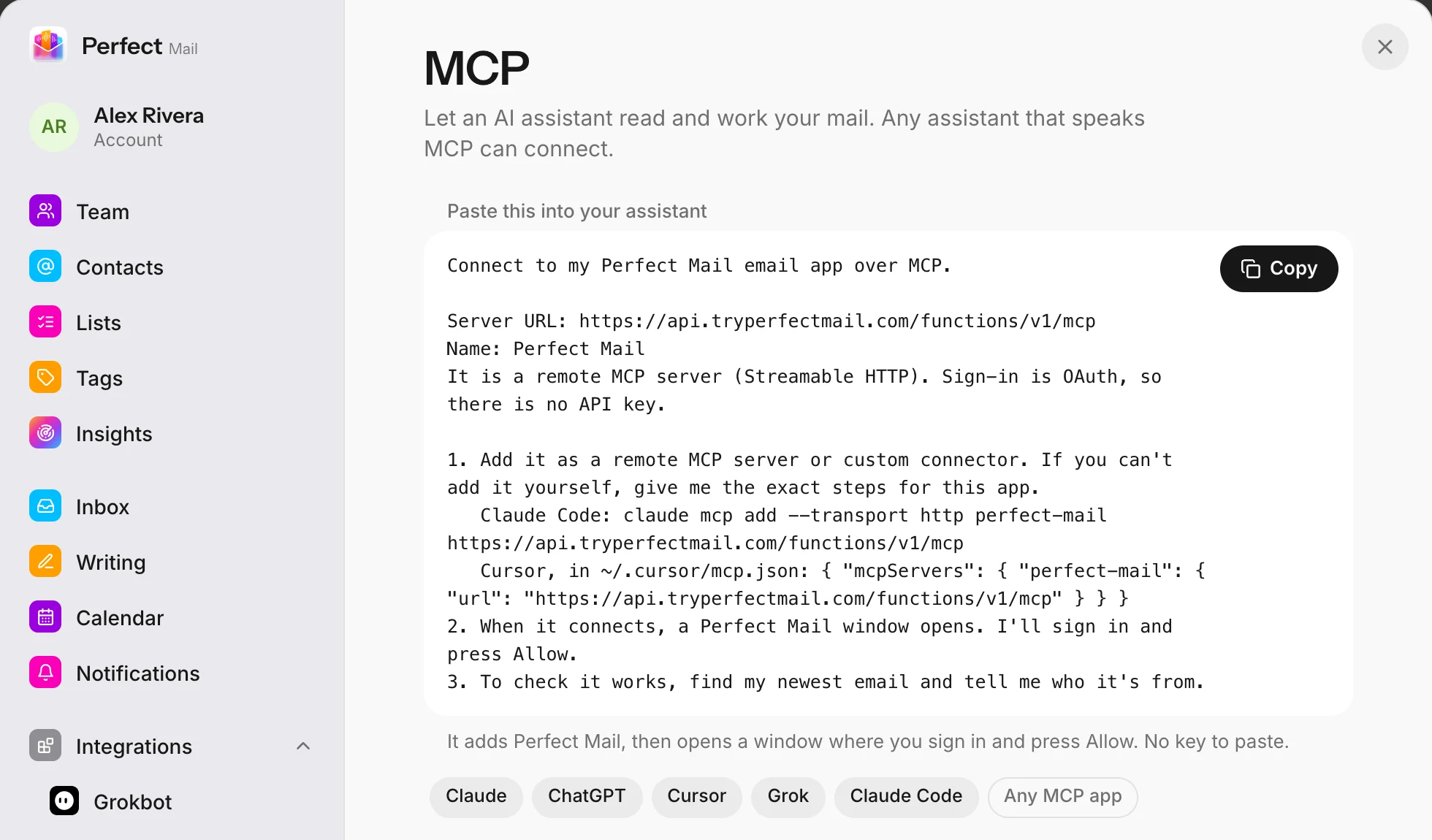
Go to Settings, then Integrations, then MCP.
2
Paste it into your assistant
Copy the block there and paste it into Claude, ChatGPT, Cursor or Grok. It adds Perfect Mail by itself.
3
Press Allow
A Perfect Mail window opens. Sign in and press Allow. There’s no key to copy.
Setup for developers
Give this to your agentClaudeChatGPTCursorGrok
$ set up Perfect Mail - https://tryperfectmail.com/mcp.txt
Your agent adds Perfect Mail, then a Perfect Mail window opens. Sign in and press Allow.
The server address is https://api.tryperfectmail.com/functions/v1/mcp. Sign-in is OAuth, so there is no key.
Claude
Settings → Connectors → Add custom connector. Paste the server address.
Claude Code
claude mcp add --transport http perfect-mail https://api.tryperfectmail.com/functions/v1/mcp

 Your AI assistant